
What is Operating System? Tutorial
 Nathaniel Brooks
⚡ Smart Summary
An Operating System (OS) is system software that manages computer hardware and software resources while providing essential services to programs. It acts as an intermediary between users and the machine, enabling efficient multitasking and resource allocation.
What is an Operating System?
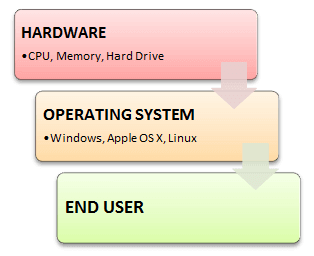
An Operating System (OS) is a software that acts as an interface between computer hardware components and the user. Every computer system must have at least one operating system to run other programs. Applications like Browsers, MS Office, Notepad Games, etc., need some environment to run and perform their tasks.
The OS helps you to communicate with the computer without knowing how to speak the computer’s language. It is not possible for the user to use any computer or mobile device without having an operating system.
To understand how operating systems evolved, let us look at their history.
History Of OS
- Operating systems were first developed in the late 1950s to manage tape storage
- The General Motors Research Lab implemented the first OS in the late 1950s for their IBM 701
- In the mid-1960s, operating systems started to use disks
- In the late 1960s, the first version of the Unix OS was developed
- The first OS built by Microsoft was DOS. It was built in 1981 by purchasing the 86-DOS software from a Seattle company
- The present-day popular OS Windows first came to existence in 1985 when a GUI was created and paired with MS-DOS.
Today, several operating systems compete for market dominance across desktops and mobile devices.
Examples of Operating System with Market Share

Following are the Operating System examples with the latest Market Share
| OS Name | Share |
|---|---|
| Android | 44.44 |
| Windows | 27.45 |
| iOS | 15.94 |
| macOS | 8.65 |
| Linux | 1.61 |
| Chrome OS | 1.36 |
With so many operating systems available, it helps to understand how they differ in design and purpose.
Types of Operating System (OS)
Following are the popular types of OS (Operating System):
- Batch Operating System
- Multitasking/Time Sharing OS
- Multiprocessing OS
- Real Time OS
- Distributed OS
- Network OS
- Mobile OS
Batch Operating System
Some computer processes are very lengthy and time-consuming. To speed the same process, jobs with a similar type of needs are batched together and run as a group.
The user of a batch operating system never directly interacts with the computer. In this type of OS, every user prepares his or her job on an offline device like a punch card and submits it to the computer operator.
Multi-Tasking/Time-sharing Operating Systems
Time-sharing operating system enables people located at a different terminal(shell) to use a single computer system at the same time. The processor time (CPU) which is shared among multiple users is termed as time sharing.
Multiprocessing Operating System
A multiprocessing operating system uses more than one CPU to execute processes. Multiple processors work in parallel, sharing the computer bus, clock, memory, and peripheral devices. This approach improves throughput and reliability because if one processor fails, the remaining processors can continue working.
Real Time OS
A real time operating system has a very small time interval to process and respond to inputs. Examples: Military Software Systems, Space Software Systems are the Real time OS example.
Distributed Operating System
Distributed systems use many processors located in different machines to provide very fast computation to its users.
Network Operating System
Network Operating System runs on a server. It provides the capability to serve to manage data, user, groups, security, application, and other networking functions.
Mobile OS
Mobile operating systems are those that are specifically designed to power smartphones, tablets, and wearable devices.
Some most famous mobile operating systems are Android and iOS, but others include HarmonyOS, Wear OS, and watchOS.
Each type of operating system performs a set of core functions that keep the system running smoothly.
Functions of Operating System
Some typical operating system functions may include managing memory, files, processes, I/O system & devices, security, etc.
Below are the main functions of Operating System:
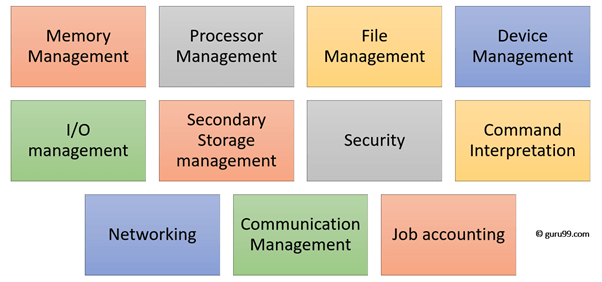
In an operating system software performs each of the function:
- Process management: Process management helps OS to create and delete processes. It also provides mechanisms for synchronization and communication among processes.
- Memory management: Memory management module performs the task of allocation and de-allocation of memory space to programs in need of these resources.
- File management: It manages all the file-related activities such as organization storage, retrieval, naming, sharing, and protection of files.
- Device Management: Device management keeps tracks of all devices. This module, also known as the I/O controller, performs the task of allocation and de-allocation of the devices.
- I/O System Management: One of the main objects of any OS is to hide the peculiarities of hardware devices from the user.
- Secondary-Storage Management: Systems have several levels of storage which includes primary storage, secondary storage, and cache storage. Instructions and data must be stored in primary storage or cache so that a running program can reference it.
- Security: Security module protects the data and information of a computer system against malware threat and unauthorized access.
- Command interpretation: This module is interpreting commands given by the user and allocating system resources to process those commands.
- Networking: A distributed system is a group of processors which do not share memory, hardware devices, or a clock. The processors communicate with one another through the network.
- Job accounting: Keeping track of time & resource used by various jobs and users.
- Communication management: Coordination and assignment of compilers, interpreters, and another software resource of the various users of the computer systems.
Beyond these functions, operating systems also offer several important features.
Features of Operating System (OS)
Here is a list of important features of OS:
- Protected and supervisor mode
- Allows disk access and file systems
- Device drivers
- Networking
- Security
- Program Execution
- Memory management
- Virtual Memory
- Multitasking
- Handling I/O operations
- Manipulation of the file system
- Error Detection and handling
- Resource allocation
- Information and Resource Protection

How Does an Operating System Work?
When you power on a computer, the operating system is the first major piece of software that loads into memory. This startup sequence is called the boot process, and it follows a specific series of steps.
First, the computer runs a small program stored in firmware called the BIOS (Basic Input/Output System) or UEFI (Unified Extensible Firmware Interface). This firmware performs a Power-On Self-Test (POST) to verify that essential hardware components such as the CPU, RAM, and storage drives are functioning correctly. Once the POST completes, the firmware locates the bootloader on the designated boot drive.
The bootloader then loads the operating system kernel into memory. The kernel initializes system drivers, sets up memory management tables, and starts essential background services known as daemons or system processes. After the kernel finishes initializing, it launches the user interface, whether that is a graphical desktop environment or a command-line shell.
At runtime, the OS continuously manages system resources. The CPU scheduler determines which processes receive processor time using algorithms such as round-robin or priority scheduling. The memory manager allocates RAM to active programs and uses virtual memory to extend available space by swapping data to disk when physical memory is full.
The OS also handles hardware abstraction. Device drivers translate generic OS commands into hardware-specific instructions, allowing applications to interact with printers, network adapters, and storage devices without needing to know the underlying hardware details. The file system organizes data on storage drives, managing read and write operations while enforcing access permissions to keep data secure.
Understanding how the OS works helps illustrate the advantages it provides to users and developers.
Advantages of Operating System
- Allows you to hide details of hardware by creating an abstraction
- Easy to use with a GUI
- Offers an environment in which a user may execute programs and applications
- The operating system must make sure that the computer system is convenient to use
- Operating System acts as an intermediary among applications and the hardware components
- It provides the computer system resources with easy to use format
- Acts as an intermediator between all hardware and software of the system
Disadvantages of Operating System
- If any issue occurs in OS, you may lose all the contents which have been stored in your system
- Operating system software is quite expensive for small size organizations which adds burden on them. Example: Windows
- It is never entirely secure as a threat can occur at any time
At the heart of every operating system lies its most critical component: the kernel.
What is Kernel in Operating System?
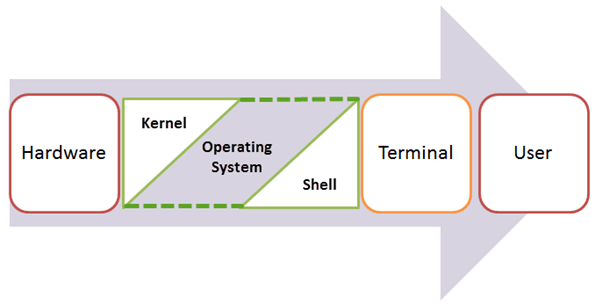
The kernel is the central component of a computer operating system. The only job performed by the kernel is to manage the communication between the software and the hardware. A Kernel is at the nucleus of a computer. It makes the communication between the hardware and software possible. While the Kernel is the innermost part of an operating system, a shell is the outermost one.
Features of Kernel
- Low-level scheduling of processes
- Inter-process communication
- Process synchronization
- Context switching
Types of Kernel
There are many types of kernels that exist, but among them, the two most popular kernels are:
1. Monolithic
A monolithic kernel is a single code or block of the program. It provides all the required services offered by the operating system. It is a simplistic design which creates a distinct communication layer between the hardware and software.
2. Microkernels
Microkernel manages all system resources. In this type of kernel, services are implemented in different address space. The user services are stored in user address space, and kernel services are stored under kernel address space. So, it helps to reduce the size of both the kernel and operating system.
As operating systems continue to evolve, artificial intelligence is playing an increasingly significant role.
How AI is Transforming Operating Systems
Artificial intelligence is reshaping how modern operating systems manage resources and interact with users. Major OS vendors now integrate AI-driven features that improve performance, security, and usability.
Intelligent Resource Management: AI algorithms analyze usage patterns to predict which applications a user will open next, preloading them into memory for faster launch times. Windows, macOS, and Android all use machine learning models to optimize CPU and battery allocation in real time.
Enhanced Security: AI-powered threat detection systems within the OS can identify malware and suspicious behavior by analyzing patterns rather than relying solely on signature databases. This proactive approach catches zero-day threats that traditional antivirus methods might miss.
Voice and Natural Language Interfaces: Built-in AI assistants such as Copilot, Siri, and Google Assistant allow users to control OS functions through natural language commands, making computing more accessible.
Automated System Maintenance: AI enables the OS to automatically schedule updates, clear caches, and optimize storage based on learned user behavior, reducing the need for manual system administration.
Difference between Firmware and Operating System
Below are the Key Differences between Firmware and Operating System:
| Firmware | Operating System |
|---|---|
| Define Firmware: Firmware is one kind of programming that is embedded on a chip in the device which controls that specific device. | Define Operating System: OS provides functionality over and above that which is provided by the firmware. |
| Firmware is programs that have been encoded by the manufacturer of the IC or something and cannot be changed. | OS is a program that can be installed by the user and can be changed. |
| It is stored on non-volatile memory. | OS is stored on the hard drive. |
Difference between 32-Bit and 64-Bit Operating System
Below are the Key Differences between 32-Bit and 64-Bit Operating System:
| Parameters | 32-Bit | 64-Bit |
|---|---|---|
| Architecture and Software | Allow 32 bit of data processing simultaneously | Allow 64 bit of data processing simultaneously |
| Compatibility | 32-bit applications require 32-bit OS and CPUs. | 64-bit applications require a 64-bit OS and CPU. |
| Systems Available | Windows 10 (32-bit), older versions of Linux, and legacy systems. | Windows 10, Windows 11, macOS, and all modern Linux distributions. |
| Memory Limits | 32-bit systems are limited to 4 GB of RAM. | 64-bit systems allow a maximum of 16 exabytes (about 17 billion GB) of RAM. |
