
Jak zvládat upozornění a vyskakovací okna v Selenium?
 Krishna Rungta
⚡ Chytré shrnutí
Alerts and popups in Selenium jsou JavaScript dialogs and child windows that block automation flow. This article explains how to identify simple, prompt, and confirmation alerts, switch into them with WebDriver, and manage multiple windows using getWindowHandles().

What is an Alert in Selenium?
An Upozorněte Selenium je malý JavaScript dialog box that appears on the screen to give the user some information or notification. It can confirm a specific action, request permission to perform an operation, or display a warning message.
In this tutorial, you will learn how to handle popups in Selenium and the different types of alerts found in web application Testování. We will also see how to handle an alert in Selenium WebDriver and how to accept or reject it depending on the alert type.
Typy upozornění v Selenium
JavaScript exposes three alert dialogs that Selenium must handle differently.
1) Simple Alert
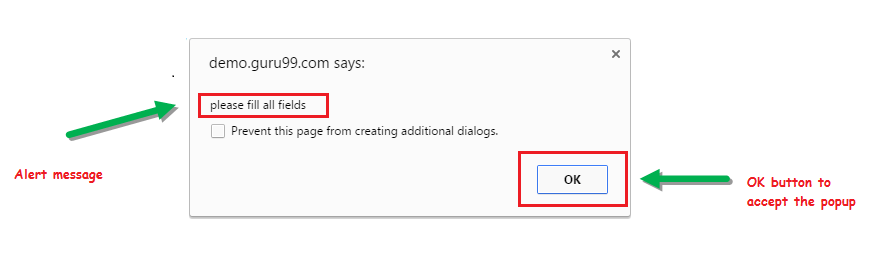
The simple alert displays information or a warning on screen. The user can only acknowledge it by clicking OK.
2) Prompt Alert
The prompt alert asks the user for input. Selenium WebDriver can type into it using sendKeys("input...").

3) Confirmation Alert
The confirmation alert asks the user to approve or cancel an operation. It exposes both OK a Zrušit Tlačítka.

How to Handle an Alert in Selenium webový ovladač
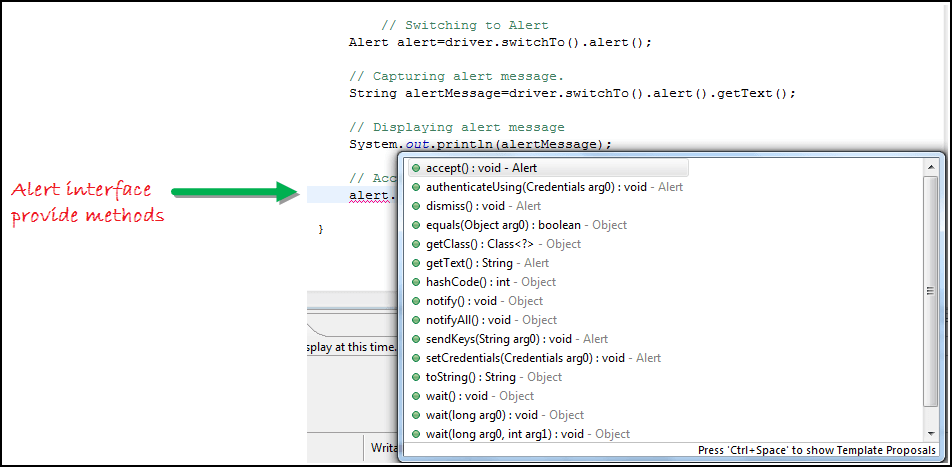
Jedno Alert interface in Selenium webový ovladač exposes four methods that cover every alert interaction.
- void dismiss() — clicks the Zrušit .
driver.switchTo().alert().dismiss();- void accept() — clicks the OK .
driver.switchTo().alert().accept();- Řetězec getText() — captures the alert message.
driver.switchTo().alert().getText();- void sendKeys(String stringToSend) — types text into a prompt alert.
driver.switchTo().alert().sendKeys("Text");Eclipse autocomplete shows the available alert methods after typing alert. on the editor line. Switch from the main window into the alert at any time using SeleniumJe .přepnout na() metoda.
Worked Example: Delete Customer Demo
Let us automate the following scenario. We will use the Guru99 demo site to illustrate Selenium alert handling.
Krok 1) Launch the browser and open https://demo.guru99.com/test/delete_customer.php.
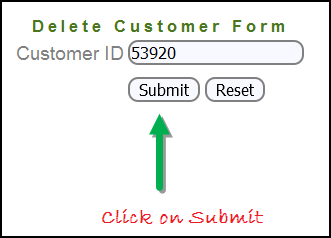
Krok 2) Enter any Customer ID.

Krok 3) Klepněte na tlačítko Odeslat .
Krok 4) Accept or dismiss the resulting confirmation alert.

Selenium Java Code: Rukojeť Confirmation Alert
import org.openqa.selenium.By;
import org.openqa.selenium.WebDriver;
import org.openqa.selenium.chrome.ChromeDriver;
import org.openqa.selenium.NoAlertPresentException;
import org.openqa.selenium.Alert;

public class AlertDemo {

    public static void main(String[] args) throws NoAlertPresentException, InterruptedException {
        // Selenium 4 ships Selenium Manager, so an explicit driver path is no longer required.
        WebDriver driver = new ChromeDriver();

        // Open the Delete Customer demo page
        driver.get("https://demo.guru99.com/test/delete_customer.php");

        driver.findElement(By.name("cusid")).sendKeys("53920");
        driver.findElement(By.name("submit")).submit();

        // Switch to the confirmation alert
        Alert alert = driver.switchTo().alert();

        // Capture the alert message
        String alertMessage = alert.getText();
        System.out.println(alertMessage);
        Thread.sleep(5000);

        // Accept the alert
        alert.accept();

        driver.quit();
    }
}
Výstup: The browser opens the Delete Customer page, submits the customer ID, accepts the confirmation alert, and removes the record from the demo application.
How to Handle Popup Windows in Selenium webový ovladač
When automation must work across multiple browser windows, the test has to switch focus between them and return to the parent window after each operation. Selenium WebDriver exposes two methods that make this possible.
driver.getWindowHandles()
Vrací Set<String> of every open window handle. Iterate over the set to switch from the main window to any child window in the application.
driver.getWindowHandle()
Vrací String with the unique handle of the current window. Capture this before opening any child window so you can return to the parent later.
Follow these steps to demonstrate window handling against the Guru99 popup demo.
Worked Example: Window Switching
Krok 1) Launch the browser and open https://demo.guru99.com/popup.php.

Krok 2) Klepněte na tlačítko Klikněte zde link. A new child window opens.

Krok 3) The child window prompts the user to enter an email ID and submit.

Krok 4) Enter the email ID and submit.

Krok 5) The page displays the access credentials returned by the demo.

After the credentials display:
- Close the child window.

- Switch focus back to the parent window.

Selenium Java Code: Handle Multiple Windows
import java.util.Iterator;
import java.util.Set;
import org.openqa.selenium.By;
import org.openqa.selenium.WebDriver;
import org.openqa.selenium.firefox.FirefoxDriver;

public class WindowHandle_Demo {

    public static void main(String[] args) throws InterruptedException {
        // Selenium 4 auto-resolves the browser driver via Selenium Manager
        WebDriver driver = new FirefoxDriver();

        driver.get("https://demo.guru99.com/popup.php");
        driver.manage().window().maximize();

        driver.findElement(By.xpath("//*[contains(@href,'popup.php')]")).click();

        String mainWindow = driver.getWindowHandle();

        // Capture every open window handle
        Set<String> allWindows = driver.getWindowHandles();
        Iterator<String> iterator = allWindows.iterator();

        while (iterator.hasNext()) {
            String childWindow = iterator.next();

            if (!mainWindow.equalsIgnoreCase(childWindow)) {
                // Switch to the child window
                driver.switchTo().window(childWindow);
                driver.findElement(By.name("emailid")).sendKeys("gaurav.3n@gmail.com");
                driver.findElement(By.name("btnLogin")).click();

                // Close the child window
                driver.close();
            }
        }
        // Return focus to the main window
        driver.switchTo().window(mainWindow);
        driver.quit();
    }
}
Výstup: The site launches, the Klikněte zde link opens a child tab, Selenium enters the email and submits, closes the child window, and returns to the parent.

Závěr
- Defined the three Selenium alert types — simple, prompt, and confirmation — with a screenshot for each.
- Demonstrated alert handling with the WebDriver
Alertinterface using a working delete-customer scenario. - Handled multiple browser windows by capturing handles with
getWindowHandle()agetWindowHandles()and switching between them.
