
How to Face Search a Person by Photo: 7 Methods
 Katherine Young

Therefore, I decided to test over 30 tools and methods before shortlisting these 8 best tricks. Additionally, I made a side-by-side comparison of these methods backed by over 4 months of data. Hence, my firsthand review helps you spot key advantages when they are compared to rival platforms. Therefore, I recommend go through this article thoroughly before you consider using any tools or methods.
 Disclaimer: This article is for general information and educational purposes only. It is important to use facial recognition tools with caution and respect people’s privacy. Guru99 doesn’t support stalking or harassment and misuse of facial recognition tools in any form.
Spokeo is my first choice for finding a person by photo or name. I upload an image or type a few details, and it cross-references billions of public records to surface matching profiles, photos, and contact info in seconds. I especially like that it previews whether a match exists before I commit, and its anti-scam focus that flags suspicious or fake profiles - which makes it the tool I trust most for accurate face searches.
Method 1: Using Spokeo Reverse Name Lookup
Spokeo is one of the top people search sites. It can help users who want to verify buyers or sellers or identify imposters. It’s important that you realise that Spokeo isn’t a direct facial recognition tool. However, it is a great background search site that can provide detailed data on people, making it valuable for security purposes. Last year, I used it to look up a person who continuously spammed my inbox on Messenger. I uploaded their images on facial recognition tools like Google Images. Once I found his real name on these sites, I ran it on Spokeo. The result brought up his other social media accounts, some images, and a few minor criminal records. However, some of the reports may have outdated information. Hence, I urge you to wait for a few days for Spokeo to send an alert once the existing report is updated.
Facial Recognition: Precise Photo Match
Preview Offered: Shows Count First
Anti-scam Focus: Highlights Scam Uses
Free Trial: 7-Days Trial for $0.95
Here’s how you can use Spokeo to search for an individual:
Step 1) Go to https://www.spokeo.com/, enter the name or other information, such as phone number, email ID, etc., of the person, and tap on Search Now.

Step 2) Within two seconds, I received several results with some basic information, such as their age. This helped me select the person I wanted to look up. You can also use filters like location, age, relative name, etc. Once selected, tap on See Results.

Step 3) The See Results provided me with more information. Finally, once you are on the next page, you can tap on Unlock Profile and then download the report.

7-Days Trial for $0.95
Method 2: How to Find a Person by Photo Using Google Images Search
Google Images is both a direct search and a reverse lookup tool that you can use to find people using their photos. Hence, anyone who wants to fact-check or is just curious about someone can use it. I found it quite robust while testing it on both my PC and my smartphone. It includes a built-in cropping tool that lets you crop the image, in case you are using a group photo to look up only a specific individual. Additionally, it helped me filter the results to find “Visual Matches“, “Exact Matches“, etc. However, make sure the image is not blurry or edited beyond the point of recognition. At times, you may have to try out with multiple images if your first few inputs do not bring up any reliable data.

Here’s a step-by-step on how to use Google Images:
Step 1) Go to https://images.google.com/ and tap on the camera icon.
Here you can upload, drag and drop, or paste a URL of the image. On smartphones, you can also use the camera icon to take a picture in real-time.

Step 2) Upload Image
Once you upload the Image, it will automatically bring up the results. You can also filter by Visual Match and Exact Match to gain more accuracy.
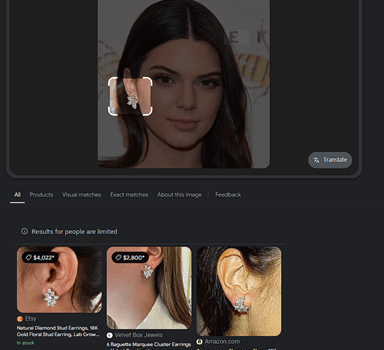
Link: https://images.google.com/
Method 3: Using Bing Visual Search
Bing Visual Search is another reverse image lookup tool that is similar to Google Images. I personally like its built-in cropping tool that help Bing focus on the subject’s face effortlessly, adding to accuracy. You can also sort the images by websites and newest or oldest. I found it helpful for looking up internet personalities, such as influencers, to find out if they are linked to any controversies before collaborating with them. However, finding social profiles isn’t its strongest suit due to limited social media integration. Moreover, at times, it gives an overwhelming amount of inaccurate results. I tackled this issue by adding supplementary words that describe the person, such as Athlete, Public Figure, etc. If you want to search for people from a specific region, you can try using a VPN.

Here’s a step-by-step on how I used Bing Visual to search:
Step 1) Visit the https://www.bing.com/visualsearch and either paste a URL, upload an image, or click a picture to look someone up.

Step 2) Once uploaded, it will automatically find the results. You can then add keywords to refine the search if your first attempt wasn’t successful.

Link: https://www.bing.com/visualsearch
Method 4: Using Yandex Images Search
Yandex Images is the strongest free reverse-image engine for face search and the OSINT community default — it returns face matches that Google deliberately blocks and indexes Russian and Eastern European sites that other engines miss, with no signup required. The single most important free supplement to a paid face-search engine, this site offers aggressive face-similarity matching across the open web, indexes Russian and Eastern European public sites missed by Google and Bing, supports place-recognition alongside face matching, and offers free unlimited searches with no signup. I found its reverse image lookup highly accurate most of the time, although its database is slightly smaller than Google’s. Additionally, I did struggle when I tested with lower-resolution images, which wasn’t much of an issue on Google. Overall, it can be pretty helpful for journalists and researchers as an additional search engine.

Use the following steps to use Yandex Images to find a person by photo:
Step 1) Start by going to https://yandex.com/images/, then tap on the camera icon and upload the image of the individual you want to look up. You can also enter a URL and then hit the Search button.

Step 2) After you upload the image, it will take you directly to the results.

While Yandex Images is a powerful tool with an extensive database, it may still lack in identifying some faces that are taken from a side angle. Moreover, it’s a Russian search engine, hence some users might not be comfortable with having to translate it every time they visit the site. Thus, I recommend trying the following method, which offers a more straightforward process.
Link: https://yandex.com/images/
Method 5: Using FaceCheck ID
FaceCheck ID is the strongest free face-search alternative on the market — the free tier returns match results with blurred thumbnails, and a paid Pro tier from $20/month unblurs results and reveals source URLs. Coverage skews to news, criminal records, and social photo galleries, making it the most popular tool among US-based skip tracers, with free face-search and blurred match previews plus source-URL visibility on paid Pro tier, dedicated reverse search across news, criminal records, and public social photo galleries, plus a self-removal request flow. During my research, it made quite an impression with its ability to recognize side profiles, which is rare. I used it to look up my nephew’s online date to help him verify the person. FaceCheck ID led me to her social media profiles and other sites. Its another unique strength is the ability to find video stills. Hence, if you screenshot a video, you can upload it to FaceCheck ID for identification. However, its database is limited, so you might not receive any results for some images. Try other sites whenever this problem arises. The AI may also return results that seem similar but aren’t the right person. Hence, verify by following the image source, such as social media links, blogs, etc.

Here are the simple steps that you can follow to use FaceCheck ID:
Step 1) First, go to https://facecheck.id/, tap on the Browse, then upload a photo or photos, and finally hit the Search Internet By Face button.

Step 2) Next, agree to its terms and conditions, clear a simple CAPTCHA, and allow the tool to search.

Step 3) Once the search is complete, you will find multiple matches and the link to the image source. Here, the matches will be rated as per their accuracy, such as 90 to 100 being high matches.

This tool can be powerful, but due to its limited database, users might have difficulty receiving the desired results for some images. There are cases when certain photos are found only on niche search tools or sites that have a different database. Hence, try the next method, which offers several products in one tool.
Link: https://facecheck.id/
Method 6: Using TinEye Reverse Search
TinEye is the specialist for finding the original source of a photo rather than face-matching — the pixel-level match algorithm catches cropped, recoloured, and watermarked copies of the same image, and the “sort by oldest” mode is the right tool when verifying whether a dating-profile photo is a stolen stock image used by a scammer. The site offers pixel-level reverse image search sorted by oldest match, robust detection of cropped, recoloured, mirrored, and watermarked variants, a paid API for newsroom and stock-licensing workflows, and a long historical index for tracing the original appearance of a viral image. It not only performs reverse search but also offers other tools like the MatchEngine that can find duplicate and modified images as well. Thus, making it suitable for photographers, models, and artists.I was looking for one of my relatives for a month using various search processes. But being a very private individual, he hardly ever posts anything online. Luckily, with the help of TinEye, I could find a few matches that led me to a blog post about their small business. Unfortunately, TinEye does not include social media in its database. Therefore, if you want to find social handles, try the other methods given above. Moreover, I couldn’t find results for certain image formats; thus, it’s best you upload JPG, PNG, etc, popular formats only.

You can use the following steps to find a person by photo on TinEye:
Step 1) Start by visiting https://tineye.com/, then paste a URL or upload an image of the particular individual you want to search. Once uploaded, you can tap on the 🔍

Step 2) This will show you the results along with the source link. If there are multiple results, you can filter them by website or use the Best Match option to find the most accurate photos.

TinEye offers a robust lookup tool with multiple useful products. However, it doesn’t read certain images or links, which can get frustrating. Additionally, it doesn’t find social media platform images. Hence, trying out Pinterest can be pretty effective. Read further to find out how.
Link: https://tineye.com/
Method 7: Using Pinterest’s Built-in Lookup Feature
Pinterest is a social media platform for users who like social media but hate dealing with the noise. Therefore, a private person who hardly ever uses the well-known giants like Facebook and Instagram might be using Pinterest instead. This platform can be helpful for business owners, curious individuals, and even genealogy researchers. This one time, I found out that an NYC influencer who pretends to be a commoner comes from a long line of a noble Italian family. Hence, Pinterest’s built-in reverse lookup might lead you to such random, valuable finds. However, this feature is limited to Pinterest only. Therefore, you must upload the photo and delete it after the search is completed, since it’s a social platform.

Use the following steps to use Pinterest’s built-in reverse lookup feature:
Step 1) Go to the Pinterest app on your phone or on your web browser by visiting https://www.pinterest.com/, then click on the plus sign to upload a pin (image).

Step 2) Once you upload it, tap on the image to use its built-in reverse search. This will bring up similar and close enough images. Scroll through, and find the right person by paying attention to small details such as names and keywords.
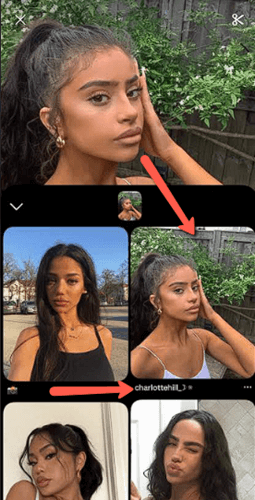
Link: https://www.pinterest.com/
How to Run an Accurate Face Search by Photo
Accuracy on a face-by-photo search depends almost entirely on input quality and the engine you pick. Here’s the workflow professional OSINT investigators use today.
- Pick the best available source photo. Front-facing, eyes open, single subject, neutral expression, good lighting. Side profiles and obstructed faces drop accuracy by 30–50%. If you have multiple photos of the same person, run the clearest one first and use the others as confirmation.
- Crop tight to the face. Background, clothing, and props distract the facial-recognition embedding and pull results toward visually similar but different people. Crop to roughly the head and shoulders, then run the search.
- Run the photo through at least two engines. A dedicated paid face-search engine is the right starting point for thorough investigation. Yandex Images is the strongest free engine for face search. FaceCheck ID is a useful third opinion. Each engine catches results the others miss.
- Verify before drawing a conclusion. A single match is a lead, not a verdict. Cross-check at least two data points before treating a result as confirmed — for example, the matched name appearing on the same web page as the matched photo plus an independent confirmation from a second engine.
- Document the search trail. If the face search is part of a safety investigation — custody, harassment, online dating verification — record the input photo, the engines used, the date, and the source URLs returned. Chain-of-evidence matters if the result is later used in a legal or formal proceeding.
For the casual case — confirming whether a dating profile is authentic — Yandex plus a paid engine covers most scenarios in three or four searches.
Is Face Search by Photo Legal?
Face-by-photo search lives in a tighter legal envelope than most reverse-image search today. The EU AI Act, in force since 2025, categorises certain biometric-identification systems as prohibited or high-risk; commercial face-search engines targeting EU residents must now demonstrate a lawful basis for processing biometric data. The UK ICO published an opinion treating indiscriminate scraping of facial images as unlawful, which constrains UK-facing services. In the US, Illinois (BIPA), Texas (CUBI), and Washington (HB 1493) impose statutory damages for collecting biometric data without consent — the source of major class-action settlements against Clearview AI and others. The legal floor across jurisdictions: self-search is legal everywhere, consent-based identity verification is legal everywhere, and searching for an identifiable third party without consent is restricted. Personal verification of an online dating match or a suspected scammer typically falls within the legitimate-interest exemption under GDPR and similar laws. Commercial face-search for hiring, tenant screening, credit decisions, or law-enforcement use without a court order is more tightly regulated and may require a different legal pathway entirely.
How to Remove Your Face From a Face-Search Engine Index
If a face-by-photo search returns your face in results you don’t want indexed, every legitimate engine offers an opt-out flow. The process takes effort but works.
- Dedicated face-search engines. Visit each engine’s opt-out page. Upload a clear front-facing photo of yourself and a redacted government ID confirming the photo is you. The provider’s team reviews the request and removes matching results from the index. Free; typical turnaround is roughly a fortnight.
- FaceCheck ID. Visit the Contact Us page on facecheck.id and submit a removal request with the same documentation. FaceCheck ID processes removals manually; the turnaround is usually faster than larger competitors.
- Yandex Images. Use the “Report a problem” link beneath any image result that shows your face. Yandex’s removal process is slower and less reliable than the dedicated face-search engines because Yandex is a general-purpose reverse-image engine, not a facial-recognition service.
- Google Search. Use Google’s “Remove personal information” tool at support.google.com/websearch/answer/9673730. Effective for taking down personally identifying images appearing in Google search results.
- Source removal at the origin. The most durable fix is removing the image at its original host. If your face appears on an old blog, a former employer’s website, or an inactive social account, contact the host and request removal. Engines re-crawl periodically and drop pages that return 404 — the result silently disappears from search.
- Stay vigilant. New photos appear over time. Re-run the opt-out cycle every six months for ongoing peace of mind, particularly if you’re in a profession that attracts unwanted attention.
The right approach is layered — opt-out on the engines, plus source removal where you can.
What Are the Best Practices To Get Accurate Results with Facial Search
Here are some of the best practices that you must know before you use facial recognition tools:
- Use High-Resolution Images: Always use high-resolution images that can be scanned properly by the facial recognition tools. Ensure that they aren’t over-edited to the point where their quality and the person’s features have become distorted. If its an old image, you must use image enhancers before using the reverse image lookup tools.
- Good Lighting and Angles: If the images have a dim lighting, it gets difficult for the AI to recognize the person. I suggest selecting pictures taken under good lighting and avoiding harsh shadows as well. You must also use front-facing photos, as not all of these tools can recognize the size profile.
- Avoid Heavy Filters and Makeup: The beauty filters and heavy makeup can confuse the tool, by changing the features of the face. I have noticed several mismatches when I tested with images that had too many filters, giving unnatural features.
- Crop Out Distractions: At times, you might not be able to find their single photo; in such cases, crop everyone out. Moreover, if the image has too much going on in the background or there are too many elements in the picture, the tool could get confused.
- Use Multiple Angles if Available: If one image fails to yield results, you must keep trying with other pictures and use different angles. You can also upload bulk images in tools that support this feature. This way, using the facial features from multiple photos, the tool will be able to search its database better.
- Check and Clean Metadata: There are many tools that can analyze the IPTC or EXIF metadata, such as the timestamps and location coordinates. So you can clean metadata with stripping tools if required to adjust the image details.
- Avoid Obstructions: Many times, sunglasses, hats, and other heavy accessories that cover the features can obstruct the tool. This restricts them from reading the face accurately.
- Match Image Quality Across Tools: The different facial recognition tools work with different image formats and resolutions. You must optimize the image to meet a tool’s requirements so that it can scan correctly.
- Use Recent Photos: People’s appearances can change significantly when they grow older. It is also possible that the target person has now changed their grooming style, and they look completely different. Hence, always use an updated image.
- Convert Screenshots to Original Quality: If you are going to upload screenshots, the image quality will likely drop significantly, especially if you use a snap from a video. This is why it’s necessary to convert them to high quality.
How to Face Search By Photo Without Using Facial Recognition Tools
If none of the above methods work for you, try the following tips that do not require using a reverse look-up site or tool:
- Ask Family and Friends: Go to your family members and friends and ask if they know the person in the image, especially if a reverse image search catfish check returned no leads. You can also request them to inquire about it to their friends and extended relatives.
- Use a Private Investigator: Hiring a private investigator can be a helpful method if you do not want to investigate on your own. They can efficiently serve the result on your plate, however, this trick can be slightly expensive, and it must be considered only during dire situations.
- Mine EXIF/IPTC Metadata: Images usually have metadata. Therefore, mining it can help you gather valuable information about the person in the picture. Some images might have the data available in the details section, and for some, you may need tools like https://exif.tools/. Here’s how the metadata extracted by Exif.tools looks like:
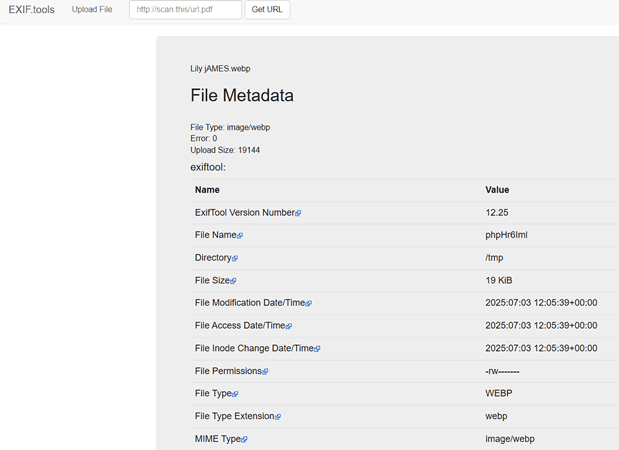
- Geo-locate background manually: Zoom into the background and important landmarks that you might find in these images. This could give you clues about the picture and the person, for example, where they work, making identification easier.
- Crowd-source: Post the image of the person on social media or community forums and ask people to help identify the individual. If you follow celebrity gossip or love using social media, you must know how Justin Bieber’s followers discovered Cindy Kimberly after he posted her on his IG captioning, “Omg who is this!!” back in 2015.

- Scan for watermarks or logos: You can also look carefully in the image for clues like watermarks or logos. Some image watermarks include a social media username. I also suggest looking closely to see if they are wearing a uniform or a sweatshirt with any institution’s name on it.
- Check public records & yearbooks: You can check yearbooks, public records, local newspapers, and other press releases. This will help you shortlist matches and find out who the person in the photo is.
- Micro-targeted social ads: You can also pay and get an ad graphic, start small by just paying for local impressions. This is similar to crowd sourcing, hence, people can help you find who the person in the image is.
FAQs
Conclusion
All of the above methods on how to face search person by photo offer reliable results most of the time. Just like every other technology, these methods also have their shortcomings. However, cross-verifying, using multiple methods to ensure accuracy, and using a good quality image supported by the tool are likely to combat most of the issues. As per my experience, I’d suggest usingSpokeo, Google Images and similar sites, (for additional verification), and FaceCheck ID to gain the best results.
