
XPath में शामिल है: पाठ, निम्नलिखित भाई-बहन और पूर्वज Selenium
 Krishna रूंगटा
🚀 स्मार्ट सारांश
XPath में शामिल है, भाई-बहन, और पूर्वज Selenium संरचित संबंधों और टेक्स्ट पैटर्न का उपयोग करके सटीक वेब तत्व पहचान सक्षम करें। ये XPath फ़ंक्शन जटिल DOM पदानुक्रमों में स्वचालन विश्वसनीयता, लचीलापन और रखरखाव क्षमता को बढ़ाते हैं।

XPath में क्या शामिल है?
XPath में शामिल है XPath एक्सप्रेशन के भीतर एक फ़ंक्शन है, जिसका उपयोग किसी विशिष्ट टेक्स्ट वाले वेब तत्वों को खोजने के लिए किया जाता है। हम इसे इस प्रकार देख सकते हैं:tracवेबपेज पर मौजूद XPath contains() फ़ंक्शन का उपयोग करके दिए गए टेक्स्ट मान से मेल खाने वाले सभी तत्वों को खोजें। XPath में contains फ़ंक्शन आंशिक टेक्स्ट वाले तत्व को खोजने की क्षमता रखता है।
उदाहरण – इसमें पाठ शामिल है
यहां हम एक एंकर खोज रहे हैं। इसमें पाठ इस प्रकार है 'SAP एम'।
"//h4/a[contains(text(),'SAP M')]"

नोट: आप इस पर निम्नलिखित XPath अभ्यास का अभ्यास कर सकते हैं https://demo.guru99.com/test/selenium-xpath.html
यदि एक साधारण एक्सपाथ अगर हमें अपनी टेस्ट स्क्रिप्ट के लिए कोई जटिल वेब एलिमेंट नहीं मिल रहा है, तो हमें XPath 1.0 लाइब्रेरी के फ़ंक्शन इस्तेमाल करने होंगे। इन फ़ंक्शन के संयोजन से, हम एक ज़्यादा विशिष्ट XPath बना सकते हैं।
👉 निःशुल्क लाइव के लिए नामांकन करें Selenium परीक्षण परियोजना
XPath में भाई-बहन का अनुसरण करना
A भाई-बहन Selenium वेबड्राइवर यह एक ऐसा फ़ंक्शन है जिसका उपयोग पैरेंट एलिमेंट के सिबलिंग वेब एलिमेंट को लाने के लिए किया जाता है। यदि पैरेंट एलिमेंट ज्ञात है, तो वेब एलिमेंट को आसानी से ढूँढा या ढूँढा जा सकता है, जिसके लिए XPath एक्सप्रेशन के सिबलिंग एट्रिब्यूट का उपयोग किया जा सकता है। Selenium वेबड्राइवर.
XPath में सहोदर उदाहरण:
यहाँ, 'a' के सहोदर अवयव के आधार पर हम 'h4' ज्ञात कर रहे हैं
"//div[@class='canvas- graph']//a[@href='/accounting.html'][i[@class='icon-usd']]/following-sibling::h4"

पूर्वज: मूल तत्व के आधार पर किसी तत्व को खोजने के लिए, हम XPath की पूर्वज विशेषता का उपयोग कर सकते हैं।

आइए इन 3 कार्यों को एक उदाहरण से समझते हैं –
परीक्षण चरण:
नोट: ट्यूटोरियल के निर्माण की तिथि से, होमपेज Guru99 को अपडेट कर दिया गया है, इसलिए परीक्षण चलाने के लिए डेमो साइट का उपयोग करें।
- https://demo.guru99.com/test/guru99home/
- 'हमारे कुछ सर्वाधिक लोकप्रिय पाठ्यक्रम' अनुभाग में, उन सभी वेब तत्वों को खोजें जो उस वेब तत्व के सहोदर हैं जिसका पाठ 'SELENIUM' है
- हम XPath टेक्स्ट contains, ancestor, और sibling फ़ंक्शन का उपयोग करके तत्वों को ढूंढेंगे।

USING में टेक्स्ट और XPath भाई-बहन शामिल हैं
import java.time.Duration;
import java.util.List;
import org.openqa.selenium.By;
import org.openqa.selenium.WebDriver;
import org.openqa.selenium.WebElement;
import org.openqa.selenium.chrome.ChromeDriver;
import org.openqa.selenium.chrome.ChromeOptions;
import org.testng.annotations.Test;

// If you prefer WebDriverManager (optional):
// import io.github.bonigarcia.wdm.WebDriverManager;

public class SiblingAndParentInXpath_Chrome {
    @Test
    public void testSiblingAndParentInXpath() {

        // === Option A: Use local ChromeDriver binary path ===
        // Update this path to your chromedriver location:
        System.setProperty("webdriver.chrome.driver", "C:\\chromedriver.exe");

        // === Option B: Use WebDriverManager (uncomment next line and remove Option A lines) ===
        // WebDriverManager.chromedriver().setup();

        ChromeOptions options = new ChromeOptions();
        // Add any flags you need, e.g. headless:
        // options.addArguments("--headless=new");

        WebDriver driver = new ChromeDriver(options);
        try {

            driver.manage().timeouts().implicitlyWait(Duration.ofSeconds(10));
            driver.manage().window().maximize();
            driver.get("https://demo.guru99.com/test/guru99home/");

            // Find all siblings (divs) next to the 'SELENIUM' tile within
            // the "A few of our most popular courses" section.
            // Steps encoded in XPath:
            // 1) Locate the H2 that contains the section title
            // 2) Move to its parent DIV
            // 3) Inside it, locate the link with text 'SELENIUM'
            // 4) From the SELENIUM tile's parent DIV, get following sibling tiles

            List<WebElement> dateBox = driver.findElements(By.xpath(
                "//h2[contains(., 'A few of our most popular courses')]/parent::div" +
                "//a[normalize-space(.)='SELENIUM']/parent::div" +
                "/following-sibling::div[contains(@class,'rt-grid-2')]"
            ));

            // Print the text of each sibling element
            for (WebElement el : dateBox) {
                System.out.println(el.getText());
            }

        } finally {
            driver.quit();
        }
    }
}
आउटपुट इस प्रकार होगा:

XPath पूर्वज Selenium
XPath पूर्वज Selenium यह एक फ़ंक्शन है जिसका उपयोग निर्दिष्ट परत पर किसी विशिष्ट तत्व के पूर्वज को खोजने के लिए किया जाता है। लौटाए जाने वाले पूर्वज का स्तर या सदस्य के स्तर के सापेक्ष पूर्वज का स्तर स्पष्ट रूप से निर्दिष्ट किया जा सकता है। यह पूर्वज से पदानुक्रमित चरणों की संख्या लौटाता है, और उपयोगकर्ता द्वारा वांछित निर्दिष्ट पूर्वज का पता लगाता है।
अब, मान लीजिए कि हमें 'लोकप्रिय पाठ्यक्रम' अनुभाग में सभी तत्वों को उस एंकर के पूर्वज की सहायता से खोजना है जिसका टेक्स्ट 'सेलेनियम' है
यहाँ हमारी xpath क्वेरी कुछ इस प्रकार होगी
"//div[.//a[text()='SELENIUM']]/ancestor::div[@class='rt-grid-2 rt-omega']/following-sibling::div"
पूर्ण Code
import java.time.Duration;
import java.util.List;
import org.openqa.selenium.By;
import org.openqa.selenium.WebDriver;
import org.openqa.selenium.WebElement;
import org.openqa.selenium.chrome.ChromeDriver;
import org.openqa.selenium.chrome.ChromeOptions;
import org.testng.annotations.Test;

public class AncestorInXpath_Chrome {

@Test

    public void testAncestorInXpath() {

        // Set path to your ChromeDriver executable
        System.setProperty("webdriver.chrome.driver", "C:\\chromedriver.exe");

        ChromeOptions options = new ChromeOptions();
        WebDriver driver = new ChromeDriver(options);

        try {

            driver.manage().timeouts().implicitlyWait(Duration.ofSeconds(10));
            driver.manage().window().maximize();
            driver.get("https://demo.guru99.com/test/guru99home/");

            // Search all elements in 'Popular course' section
            // using the ancestor of the 'SELENIUM' link

            List <WebElement> dateBox = driver.findElements(
                By.xpath("//div[.//a[text()='SELENIUM']]/ancestor::div[@class='rt-grid-2 rt-omega']/following-sibling::div")
            );

            // Print all sibling elements of the 'SELENIUM' tile

            for (WebElement element : dateBox) {
                System.out.println(element.getText());
            }

        } finally {
            driver.quit();
        }
    }
}
आउटपुट इस प्रकार दिखेगा-

AND और OR का प्रयोग
AND और OR का उपयोग करके, आप हमारे XPath अभिव्यक्ति में 2 शर्तें रख सकते हैं।
- AND के मामले में, दोनों स्थितियाँ सत्य होनी चाहिए, तभी यह तत्व ढूंढता है।
- OR के मामले में, दो में से कोई एक शर्त सत्य होनी चाहिए, तभी यह तत्व ढूंढता है।
यहाँ, हमारी XPath क्वेरी इस प्रकार होगी
Xpath=//*[@type='submit' OR @name='btnReset']
Xpath=//input[@type='submit' and @name='btnLogin']

परीक्षण चरण:
- https://demo.guru99.com/v1/
- इस अनुभाग में, हम XPath के विभिन्न कार्यों वाले तत्वों की खोज के लिए उपरोक्त डेमो साइट का उपयोग करेंगे।
आपको AND और OR, पैरेंट, स्टार्ट-विथ, और XPath अक्षों का उपयोग करके एक तत्व मिलेगा
और या उदाहरण
import org.openqa.selenium.By;
import org.openqa.selenium.WebDriver;
import org.openqa.selenium.WebElement;
import org.openqa.selenium.chrome.ChromeDriver;

public class AND_OR {
	public static void main(String[] args) {
		WebDriver driver;
		WebElement w,x;
		System.setProperty("webdriver.chrome.driver","E://Selenium//Selenium_Jars//chromedriver.exe");
		 driver= new ChromeDriver();

         // Launch the application
     	 driver.get("https://www.guru99.com/");

     	//Search element using OR in the xpath
     	 w=driver.findElement(By.xpath("//*[@type='submit' OR @name='btnReset']"));

     	 //Print the text of the element
			System.out.println(w.getText());

		//Search element using AND in the xpath
			x=driver.findElement(By.xpath("//input[@type='submit' and @name='btnLogin']"));

		//Print the text of the searched element
			System.out.println(x.getText());

	//Close the browser
     driver.quit();
	}

}
XPath पैरेंट इन Selenium
माता-पिता Selenium वेब पेज में चयनित वर्तमान नोड के पैरेंट नोड को पुनः प्राप्त करने के लिए उपयोग की जाने वाली एक विधि है। यह उन स्थितियों में बहुत उपयोगी है जहाँ आप कोई तत्व चुनते हैं और XPath का उपयोग करके पैरेंट तत्व प्राप्त करना चाहते हैं। इस विधि का उपयोग पैरेंट के पैरेंट को प्राप्त करने के लिए भी किया जाता है।
यहाँ, हमारी XPath क्वेरी इस प्रकार होगी
Xpath=//*[@id='rt-feature']//parent::div

पैरेंट का उपयोग करके XPath
import org.openqa.selenium.By;
import org.openqa.selenium.WebDriver;
import org.openqa.selenium.WebElement;
import org.openqa.selenium.chrome.ChromeDriver;


public class Parent {
	public static void main(String[] args) {
		WebDriver driver;
		WebElement w;

		System.setProperty("webdriver.chrome.driver","E://Selenium//Selenium_Jars//chromedriver.exe");
		 driver= new ChromeDriver();

         // Launch the application
     	 driver.get("https://www.guru99.com/");

     	 //Search the element by using PARENT
     	 w=driver.findElement(By.xpath("//*[@id='rt-feature']//parent::div"));

		//Print the text of the searched element
     	 System.out.println(w.getText());

	//Close the browser
     driver.quit();
	}
}
इसके साथ आरंभ होता है
Starts-with फ़ंक्शन का उपयोग करके, आप उस तत्व को ढूंढ सकते हैं जिसका गुण रिफ्रेश या क्लिक, सबमिट आदि जैसे अन्य ऑपरेशनों पर गतिशील रूप से बदलता है।
यहाँ हमारी XPath क्वेरी कुछ इस प्रकार होगी
Xpath=//label[starts-with(@id,'message')]

import org.openqa.selenium.By;
import org.openqa.selenium.WebDriver;
import org.openqa.selenium.WebElement;
import org.openqa.selenium.chrome.ChromeDriver;


public class StartsWith {
	public static void main(String[] args) {
		WebDriver driver;
		WebElement w;

		System.setProperty("webdriver.chrome.driver","E://Selenium//Selenium_Jars//chromedriver.exe");
		 driver= new ChromeDriver();

         // Launch the application
     	 driver.get("https://www.guru99.com/");

     	 //Search the element by using starts-with
     	 w=driver.findElement(By.xpath("//label[starts-with(@id,'message')]"));

     	 //Print the text of the searched element
     	System.out.println(w.getText());

     	//Close the browser
	        driver.quit();
	}
}
Xpath अक्ष
XPath अक्षों का उपयोग करके, आप वेब पेज पर गतिशील और बहुत जटिल तत्वों को खोज सकते हैं। XPath अक्षों में तत्व खोजने के लिए कई विधियाँ होती हैं। यहाँ, कुछ विधियों पर चर्चा की जाएगी।
निम्नलिखित: यह फ़ंक्शन विशेष घटक का तत्काल तत्व लौटाएगा।
यहाँ हमारी XPath क्वेरी कुछ इस प्रकार होगी
Xpath=//*[@type='text']//following::input
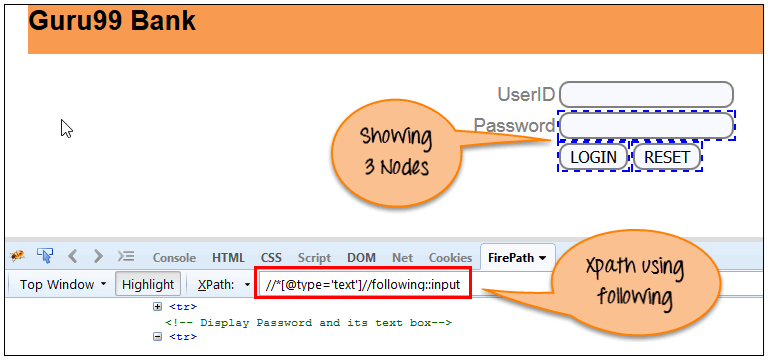
import org.openqa.selenium.By;
import org.openqa.selenium.WebDriver;
import org.openqa.selenium.WebElement;
import org.openqa.selenium.chrome.ChromeDriver;


public class Following {
	public static void main(String[] args) {
		WebDriver driver;
		WebElement w;

		System.setProperty("webdriver.chrome.driver","E://Selenium//Selenium_Jars//chromedriver.exe");
		 driver= new ChromeDriver();

         // Launch the application
     	 driver.get("https://www.guru99.com/");

     	 //Search the element by using Following method
     	 w=driver.findElement(By.xpath("//*[@type='text']//following::input"));

		//Print the text of the searched element
     	 System.out.println(w.getText());

	//Close the browser
     driver.quit();
	}
}
पूर्ववर्ती: यह फ़ंक्शन विशेष तत्व के पूर्ववर्ती तत्व को लौटाएगा।
यहाँ हमारी XPath क्वेरी कुछ इस प्रकार होगी
Xpath= //*[@type='submit']//preceding::input

import org.openqa.selenium.By;
import org.openqa.selenium.WebDriver;
import org.openqa.selenium.WebElement;
import org.openqa.selenium.chrome.ChromeDriver;


public class Preceding {
	public static void main(String[] args) {

		WebDriver driver;
		WebElement w;

		System.setProperty("webdriver.chrome.driver","E://Selenium//Selenium_Jars//chromedriver.exe");
		 driver= new ChromeDriver();

         // Launch the application
     	 driver.get("https://www.guru99.com/");

     	 //Search the element by using preceding method
     	 w=driver.findElement(By.xpath("//*[@type='submit']//preceding::input"));

		//Print the searched element
     	 System.out.println(w.getText());

	//Close the browser
     driver.quit();

	}
}
d) वंशज: यह फ़ंक्शन विशेष तत्व का वंशज तत्व लौटाएगा।
यहाँ हमारी XPath क्वेरी कुछ इस प्रकार होगी
Xpath= //*[@id='rt-feature']//descendant::a

import org.openqa.selenium.By;
import org.openqa.selenium.WebDriver;
import org.openqa.selenium.WebElement;
import org.openqa.selenium.chrome.ChromeDriver;


public class Descendant {
	public static void main(String[] args) {
		WebDriver driver;
		WebElement w;
		System.setProperty("webdriver.chrome.driver","E://Selenium//Selenium_Jars//chromedriver.exe");
		 driver= new ChromeDriver();

         // Launch the application
     	 driver.get("https://www.guru99.com/");

     	 //Search the element by using descendant method
     	 w=driver.findElement(By.xpath("//*[@id='rt-feature']//descendant::a"));

		//Print the searched element
     	 System.out.println(w.getText());

	//Close the browser
     driver.quit();
	}
}
