
iOS 应用测试教程
 迈克尔汤普森
⚡ 智能摘要
iOS App Testing verifies that an application installs, performs, and behaves correctly on Apple devices. It combines manual techniques with automated frameworks like XCTest and XCUITest to catch crashes, incompatibilities, and memory leaks early.
什么是iOS应用测试?
iOS 应用测试 是一种测试过程,在真实的 Apple 设备上测试 iOS 应用程序,以检查它在特定的用户操作(如安装时间、用户界面、用户体验、外观、行为、功能、加载时间、性能、App Store 列表、操作系统版本支持等)方面是否按预期运行。
为什么要测试iOS应用?
iOS 应用测试 is required because iOS is Apple’s platform for mobile applications, first released on June 29, 2007. Unlike Android, Apple doesn’t license iOS for installation on non-Apple hardware. iOS and iOS applications can only be installed on Apple devices; hence, your iOS app must be compatible with the iOS versions and iOS devices your users own.
.png)
The figure below shows common questions developers face when creating an iOS application.

It doesn’t matter how much time you invest in design and implementation; mistakes are inevitable, and bugs will appear. The figure below shows some common bugs in iOS applications.

应用程序崩溃
One of the most frustrating problems when using Apple’s devices is that an application may crash frequently during execution. Often, the app crashes because of bugs or memory leaks in the code.
应用程序不兼容
Your iOS application may run perfectly on the current iOS version, but if iOS is upgraded, it may not work due to incompatibility issues.
安全漏洞
A security vulnerability in iOS allows a hacker to attack your iOS devices and steal your private information. Over the years, severe iPhone security vulnerabilities have been discovered in different iOS versions.
内存泄漏
内存泄漏是指程序不再使用的已分配内存块。内存泄漏会导致 iOS 应用程序崩溃。
它们是错误,应该被修复。
iOS 测试 MindMap
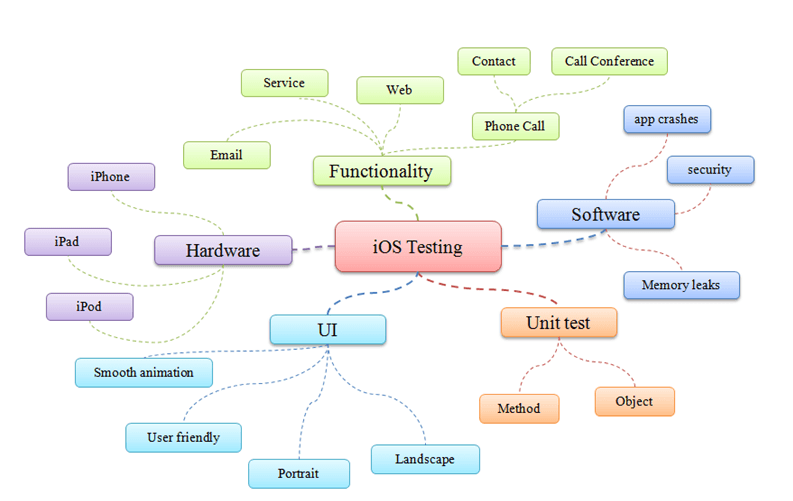
As shown in the above figure, the iOS 测试与验证 MindMap shows all the items that a tester should consider when conducting testing on iOS.
iOS 应用程序测试清单
This checklist is specifically designed to test the characteristics of iOS mobile applications. Obviously, it tests only generic application characteristics and not the functionality of the app.
- Check the installation time taken by the application onto the device. Make sure that the application is installed within an acceptable time.
- Once the application is installed, check whether the application has an app icon and name. Also, make sure that both icon and name are self-explanatory, reflecting the core intention of the application.
- Launch the application and check whether a splash screen is displayed.
- Check the splash screen timeout and time taken to load the home screen. The Home screen of the application should load within an acceptable time. If the Home screen takes too long to load, there is more chance for the user to quit or even uninstall the application itself. Also, check how the contents are loaded on the Home screen.
- 应用程序的主要功能应该一目了然。它应该不言而喻。
- Check whether the app supports both landscape and portrait orientations. If so, check the app in both orientations. The application’s user interface should adjust accordingly.
- Without an internet connection, launch the application. Make sure that the app behaves as designed/desired. There is a chance that the application may crash on launch or may just display a blank screen.
- If the application uses location services, then check whether the location permission alert is displayed or not. This alert should be prompted to the user only once.
- If the application sends push notifications, then check whether the push notification permission alert is displayed or not. This alert should also be prompted to the user only once.
- Launch the application, quit it and relaunch. Check whether the app behaves as designed/desired
- 点击关闭应用程序ping the Home button of the device and open the app again. Check whether the app works as designed/desired.
- Once installed, check whether the app is listed in the iPhone’s settings app.
- After the application is made live, check whether the application can be found in the “App Store.” There will be supported OS versions for the application. So, make sure the application can be found in the “App Store” of devices on supported OS versions. Also, the application should not be listed in the “App Store” of devices on unsupported OS versions.
- 检查应用程序在后台运行时是否进入睡眠模式,以防止电池耗尽。
- 如果应用程序运行缓慢或正在加载内容,请检查是否有进度状态图标(“正在加载...”),最好带有具体消息。
- Search the application with its name in the device search bar. Check whether the app is listed
- Check whether the appearance of buttons that perform standard actions is not altered in the app (for instance: refresh, organize, trash, Reply, back, etc.)
- Check whether standard buttons are not used for functions other than those they are normally used for
iOS 测试策略
Once you know what to check, the next step is how to test it. The figure below introduces some common types of iOS testing strategy.

自动化测试
Automated testing is one of the biggest advantages in iOS testing. It enables you to detect bugs and performance issues quickly. The benefits of automated testing are shown below:
- 自动化测试可以在多台设备上运行,节省您的时间
- Automated testing can target SDKs. You can run tests on different SDK versions
- Automated testing increases your testing productivity and saves software development costs
- There are many open source testing frameworks that support automated testing on iOS
使用 OCUnit 进行单元测试
当最初的 iOS SDK 发布时,它缺少 单元测试 capabilities. So Apple brought the OC单元 unit test solution into iOS SDK version 2.2.
OCUnit was a testing framework for Objective-C on the Mac (now macOS). The biggest advantage of the OCUnit framework was its tight integration into the Xcode development environment, as shown below.
注意: OCUnit (SenTestingKit) is deprecated; since Xcode 5, Apple’s 测试 framework has replaced it as the standard — see the XCTest section below. Screenshots here show an older Xcode 版。
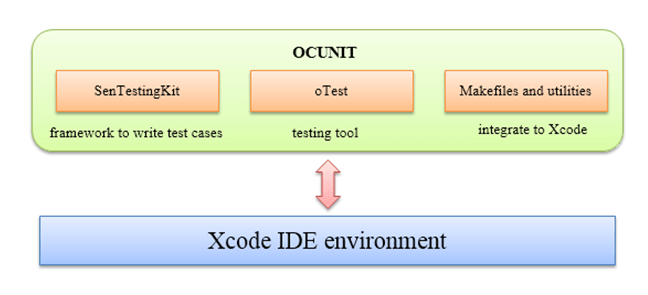
Some of the benefits of OCUnit are shown in the figure below.

使用 UIAutomation 进行 UI 测试

UI Automation was a JavaScript library provided by Apple Inc., which could be used to perform automated tests on real devices and on the iOS Simulator. This framework was added in iOS SDK 4.0. Using UI Automation, you could automate testing of the application not only on the simulator but also on a real device.
注意: Apple deprecated UI Automation in Xcode 8 (2016) and later removed it. Use XCUITest for new UI test projects; the classes and screenshots below reflect the older toolchain.
UIAutomation brought these benefits:
- Reduced effort on 手动测试
- Required less effort to execute all your tests
- Simplified the UI testing procedure (push a few buttons and run your full test suites)
The UIAutomation instrument worked from scripts written in JavaScript. It simulated user events on the target iOS application.
UIAutomation Cons vs. Pros
| 优点 | 缺点 | |
|---|---|---|
| 1. | 良好支持手势和旋转 | 它不是开源的,开发人员的支持较少 |
| 2. | Can run UIAutomation tests on the device, not only the simulator. | 无法与其他工具很好地集成 |
| 3. | 在英国开发 JavaScript, a popular programming language. |

The above figure represents some common classes in the UIAutomation framework.
- 此 UIA元素 类是自动化上下文中所有用户界面元素的超类
- 此 联合会Target 类代表被测系统的高级用户界面元素
- 此 用户界面日志记录器 类提供有关检索功能的测试和错误信息
- 此 UIAActivityView 类允许访问和控制应用程序内的活动视图。
- 此 UIAActionSheet 类允许访问和控制应用程序内的操作表。
- 用户 事件动作
- UISlider 类
- UIAButton 类
- UIAKey 类
- UIAKeyboard 类
其他自动化测试框架
- 坦率:自动化 验收测试 framework for iPhone and iPad (no longer actively maintained)
- KIF:是 iOS 整合测试 框架。它利用操作系统为视障人士提供的辅助功能属性,轻松实现 iOS 应用程序的自动化。
- Appium: a popular open source, 跨平台 framework that automates iOS apps through Apple’s XCUITest driver
XCTest and XCUITest: Apple’s Modern Testing Frameworks
OCUnit and UIAutomation are important history, but both are now retired. Apple replaced OCUnit with 测试 in Xcode 5 (2013) and deprecated UIAutomation in Xcode 8 (2016) in favor of XCUI测试, the UI testing component of XCTest. These are the test frameworks Apple ships and supports in every current version of Xcode.
With XCTest, you write unit tests in Swift or Objective-C and run them from the Xcode Test Navigator, the xcodebuild command line, on the Simulator, or on real devices. XCUITest drives your app through the accessibility layer, so UI tests behave much like a real user.
| Legacy framework | 现代替代品 | 改变了什么 |
|---|---|---|
| OCUnit (SenTestingKit) | 测试 | Same unit testing concepts, now built into every Xcode 项目模板 |
| UIAutomation (JavaScript) | XCUI测试 | UI tests are written in Swift or Objective-C instead of Java脚本 |
👍 提示: Cross-platform tools such as Appium automate iOS through XCUITest under the hood, so these skills transfer directly.
手动测试
Automation brings speed, but the manual techniques below add human judgment that scripts cannot provide.
探索性测试
It is testing without a formal test plan. Exploratory Testing is a low-cost testing method, but it can miss potential bugs in your iOS application.
探索性测试的优缺点
| 优点 | 缺点 | |
|---|---|---|
| 1. | Less preparation is needed; serious bugs are detected early. | 要求测试人员具备较高的技能 |
| 2. | 没有 测试计划 is needed, which speeds up bug detection. | 测试覆盖率低。它不能保证测试所有需求。 |
| 3. | 大多数错误都是通过某种探索性测试在早期发现的 | 缺乏测试文档 |
用户测试
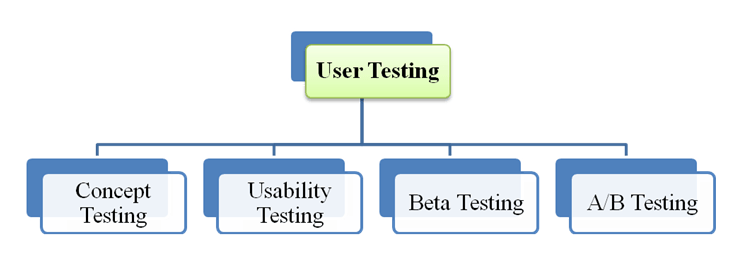
用户测试是 iOS 上的一种手动测试。这种测试的目的是创建更好的应用程序,而不仅仅是 无错误 apps. The figure below shows four types of User Testing.
概念测试
Evaluate user response to an application idea before releasing it to the market. The procedures of concept testing on iOS are described in the figure below.

可用性测试
可用性测试 is a test of how easy it is to use your iOS application. In iOS testing, a usability test can be 记录 去记住或者与他人分享。
Some tools that support usability testing on iOS are:
特里马塔 移动用户测试应用程序 Android 和iOS。
Delight.io,该工具可以捕获您 iOS 应用上的真实用户交互。
Beta测试
Beta 测试是 集成测试 with real data to get final feedback from users. To distribute your apps for beta testing, you have to follow the steps below.

–预处理:如果您正在对某个版本的最终候选版本进行 Beta 测试,请务必在将应用分发给测试人员之前对其进行验证。
–通过服务查找测试人员: you collect device IDs from testers and add them to your Apple Developer account
–创建临时分发: Ad Hoc distribution allows the tester to run your app on their device without needing Xcode.此步骤包括 2 个子步骤
- 创建分发证书
- 创建临时配置文件
–征求测试人员的反馈: Testers conduct testing and send bug reports to you. After your app is released, you can get the reports from App Store连接 (以前 iTunes Connect).
注意: Today, most teams distribute beta builds with TestFlight, which lets you invite up to 10,000 external testers without collecting device IDs manually.
A / B测试
A / B测试 是最有效的方法之一 评估你的 iOS 应用的有效性。 它用 随机实验 有两个设备 A 和 B。

A/B 测试包括三个主要步骤
- 配置测试: Prepare 2 versions of your iOS app (A & B) and a test metric
- 《测试》(Test): Test the 2 iOS app versions above on devices simultaneously.
- 分析: Measure and select the better version to release
The following tools support A/B testing on iOS.
- 出现:iOS 和 Android. It can be integrated into your iOS app and makes the testing process quicker.
A/B 测试的最佳实践
- 定义 目标 你的测试。没有目标,任何测试都是无用的。
- 观看 最终用户首次使用你的应用
- 运行 一种 test only per update. It saves your time when conducting testing
- 显示器 your test carefully. You can learn from your test by monitoring it.
iOS 测试最佳实践
以下是组织 iOS 应用程序测试时应该了解的一些技巧
- 在 真机 to get a realistic view of performance
- 提高 your testing methods, because traditional testing methods are no longer sufficient to cover all tests in iOS testing
- 使用 控制台日志 to test the iOS application. This iOS feature includes information from every application on the device.
- 文件 application bugs using the built-in screenshot command. It helps the developer understand how the bugs occur.
- 崩溃报告 tools are useful when testing your application. They can detect crashes and log details so you can investigate the bugs easily.
关于 iOS 测试的误解
本节探讨了 iOS 测试中一些常见的误解和现实
Testing applications on iOS and Android is the same thing.
iOS 和 Android are two platforms developed by Apple Inc. and Google respectively. They are totally different in test environments, test frameworks, and programming languages.
Testing the application on the iOS Simulator is enough.
The iOS Simulator is not strong enough for testing an app, because the iOS Simulator has some limitations:
- 硬件限制(摄像头、麦克风输入、传感器)
- 你的应用界面可能看起来比在设备上运行得更快、更流畅
- API 限制
- 某些框架不受支持(媒体播放器、Store Kit、消息 UI..)
Everyone will download my apps on the app store because they have many features
应用程序的功能越多,可能出现的错误就越多。如果应用程序仍存在许多缺陷,那么将没有用户下载它。
